2026 July Release
Note: this post describes the Zig version of Turian, now called TurianZ. Since version 1.0.0, Turian is a C# engine — see Turian and TurianZ.
If June was about building the foundations, July was about finishing the rooms.
Nineteen releases shipped over thirty days — including two major version bumps — with a twentieth, v3.4.0, landing two days into August. Turian Studio went from a functional editor to one that actually feels good to spend a day in.
But the story of July isn't really a list of features. It's the story of one scene.
Somewhere around the middle of the month we pointed Turian at the Amazon Lumberyard Bistro — 2.8 million triangles, 1,591 submeshes, 132 materials, 633 compressed textures, 1.4 GB of source art. It rendered 32 surfaces and then gave up. Everything that follows — the format work, the culling, the shadow rework, the profiling infrastructure, even one of the two major version bumps — traces back to making that scene load, render, and let you fly through it.
- A Studio Worth Spending Time In
- Games With a Face: In-Game GUI
- The Renderer Grows Up
- The Bistro Epic
- Import: More Than Just glTF
- Cross-Platform: Windows Arrives
- Version Bumps Without the Drama
- Laying Groundwork
- Looking Ahead
A Studio Worth Spending Time In
June's editor was functional. July's is comfortable.
Dockable Panels
Ticket #90
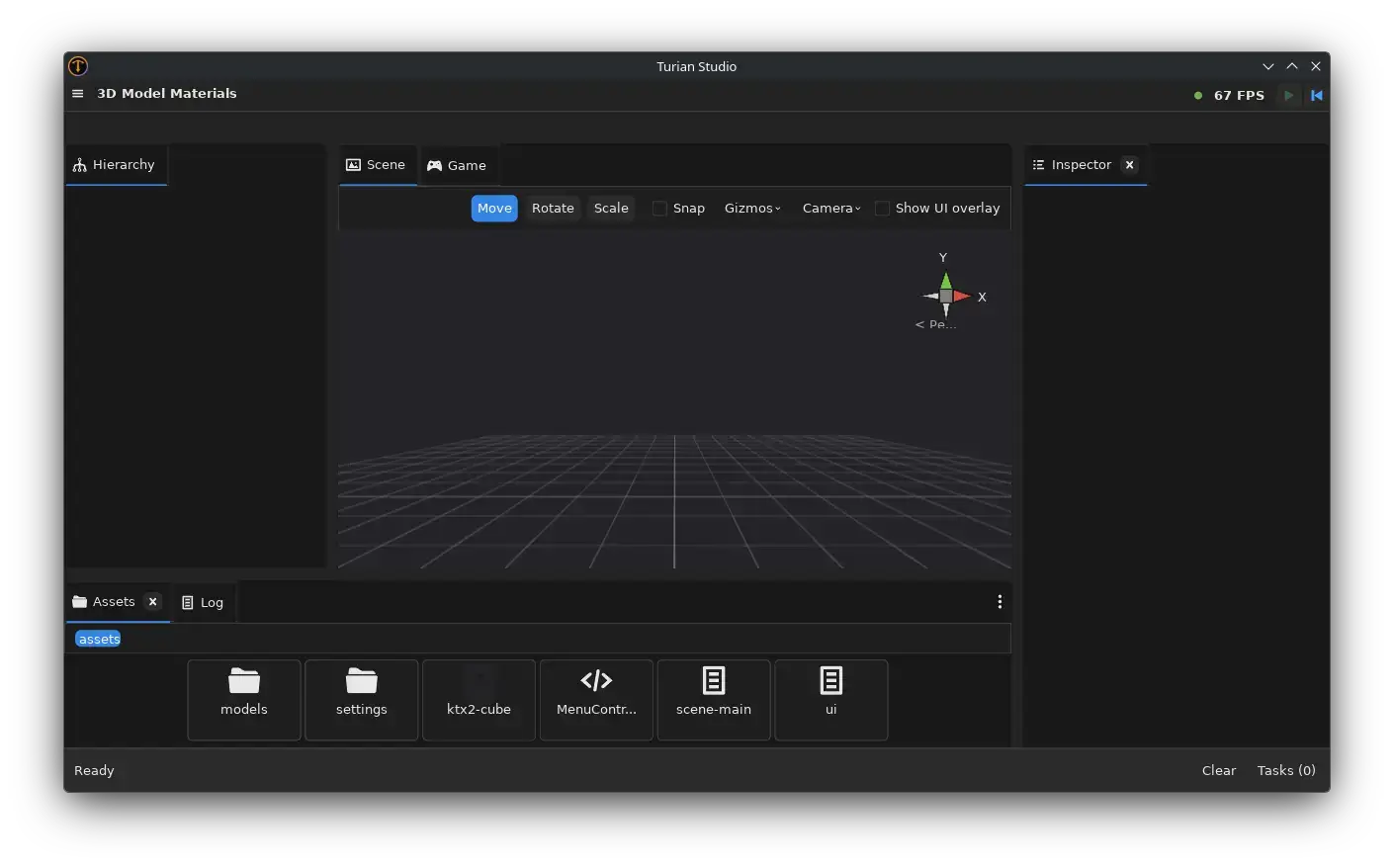
The single biggest change to the Studio workflow: panels are no longer locked in place. You can drag, dock, undock, split, and rearrange every panel — Hierarchy, Scene View, Game View, Inspector, Asset Browser, Profiler, and Log — into whatever layout suits your project.
The layout persists across sessions, so you only set it up once. And if you ever want to start fresh, "Reset Layout" restores the defaults with one click. Built-in presets (Default, 4 Split, 2x3, Tall, Wide) give you a quick starting point for different tasks — editing a scene, debugging UI, or inspecting performance.
Behind the scenes, a new Panel API lets plugins and packages register their own custom panels. The editor's composition system is no longer hardcoded; any future tool or visualizer can integrate as a first-class dockable window.
The Welcome Panel
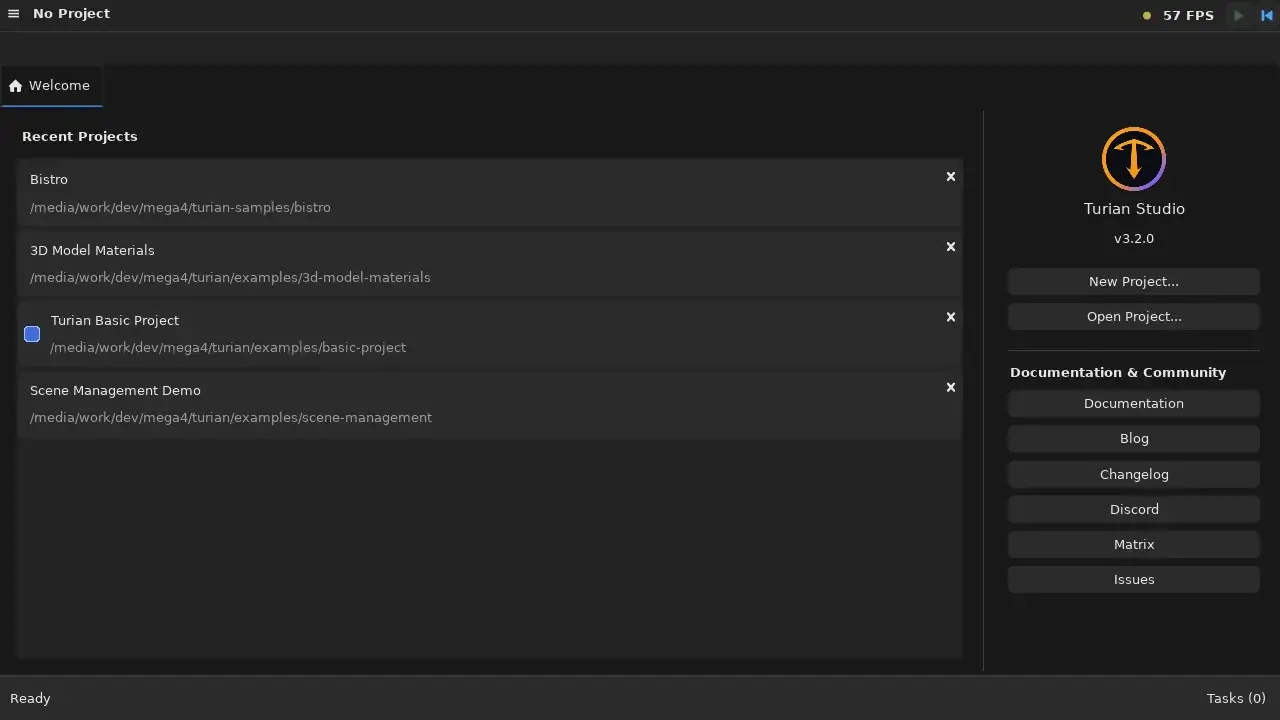
Starting the Studio without a project used to drop you into an empty Hierarchy and a blank viewport. Now you get a Welcome panel: recent projects with their paths, prominent New Project and Open Project buttons, the engine version, and direct links to the documentation, blog, changelog, Discord, Matrix and issue tracker.
It behaves like any other panel — dockable, closable — but it's the default view when no project is loaded, and it steps aside the moment one opens.
The project dropdown in the top bar grew up alongside it. Each recent project now has an "open in a new window" action, so you can have two projects side by side, and switching away from a project with unsaved changes prompts you first. That dirty-check is a shared internal API rather than a special case bolted onto the window-close handler, so every path that can lose your work — quitting, switching projects, opening another window — asks the same question.
Themes
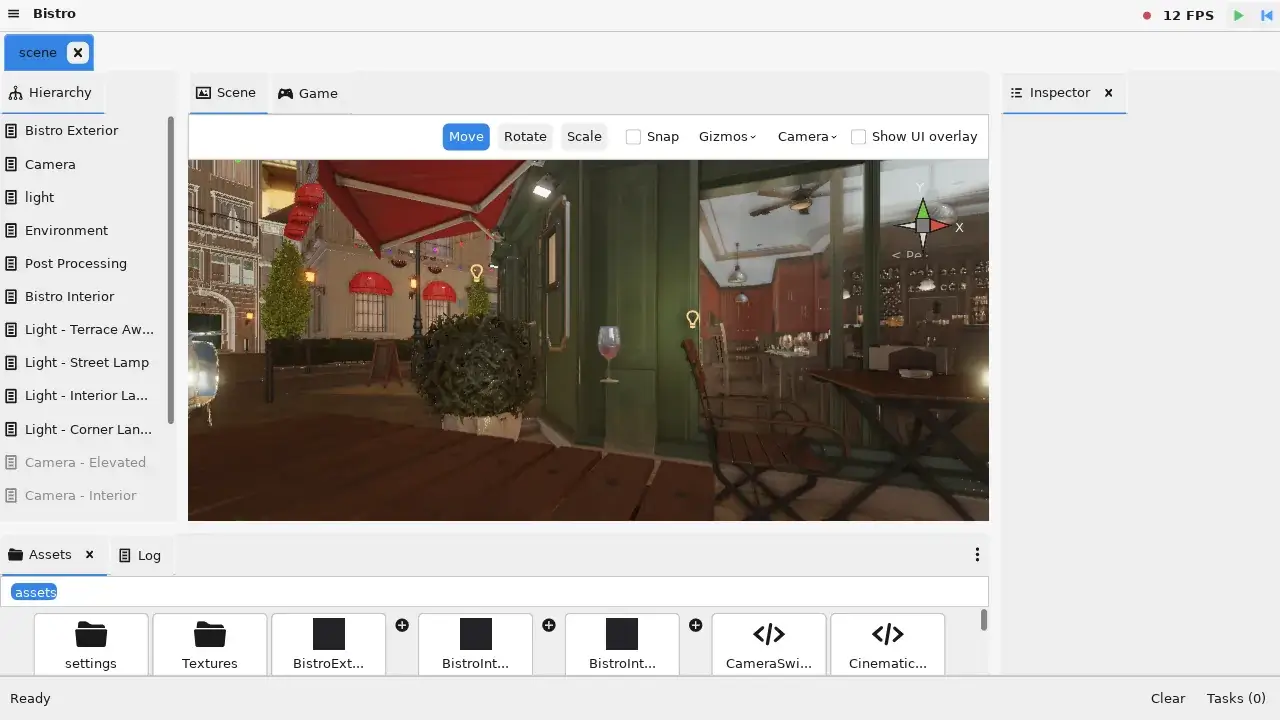
Dark, Light, Dark High Contrast, Darcula, and Catppuccin — five built-in themes ship out of the box, and you can browse them live from the View menu. Hover over a theme name to preview it instantly; click to commit and persist.
The underlying .uitheme asset type makes themes a first-class editable resource. You can create your own by duplicating an existing one and tweaking colors, corner rounding, and panel border widths — all editable in the Inspector with live preview.
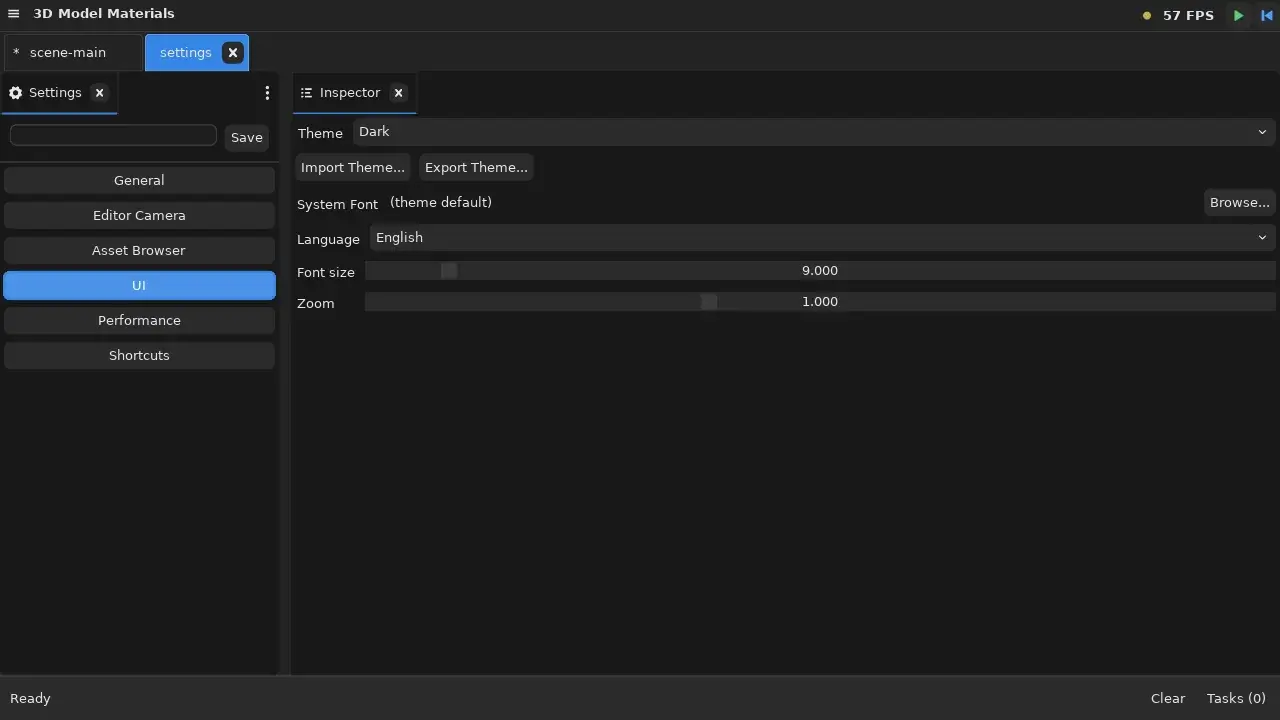
Themes can be imported and exported as files, so a studio can share one house style across a team. The same infrastructure carries font size, UI zoom, and an optional system font override — adjustable per-session from the View menu or permanently in Settings.
Drag the slider to compare the Dark and Light themes on the same editor layout:
The Output / Log Panel
Ticket #23
Every engine prints to stdout. A professional editor lets you find what you need.
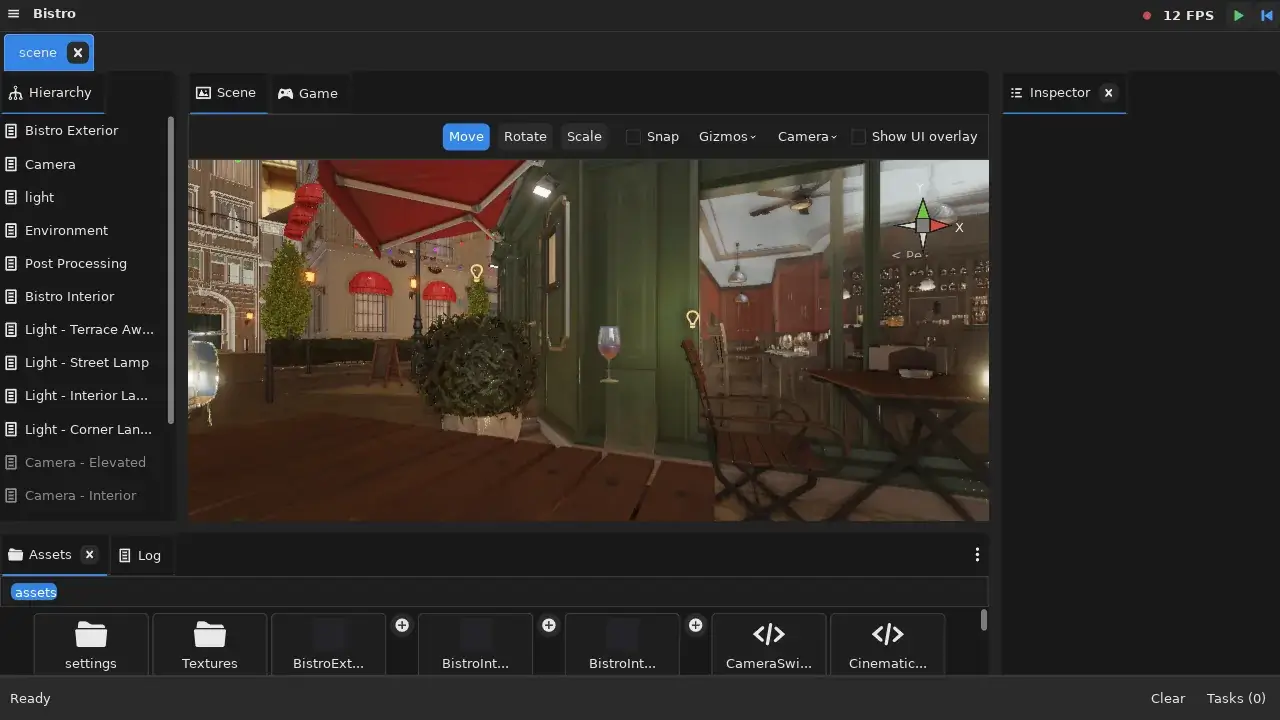
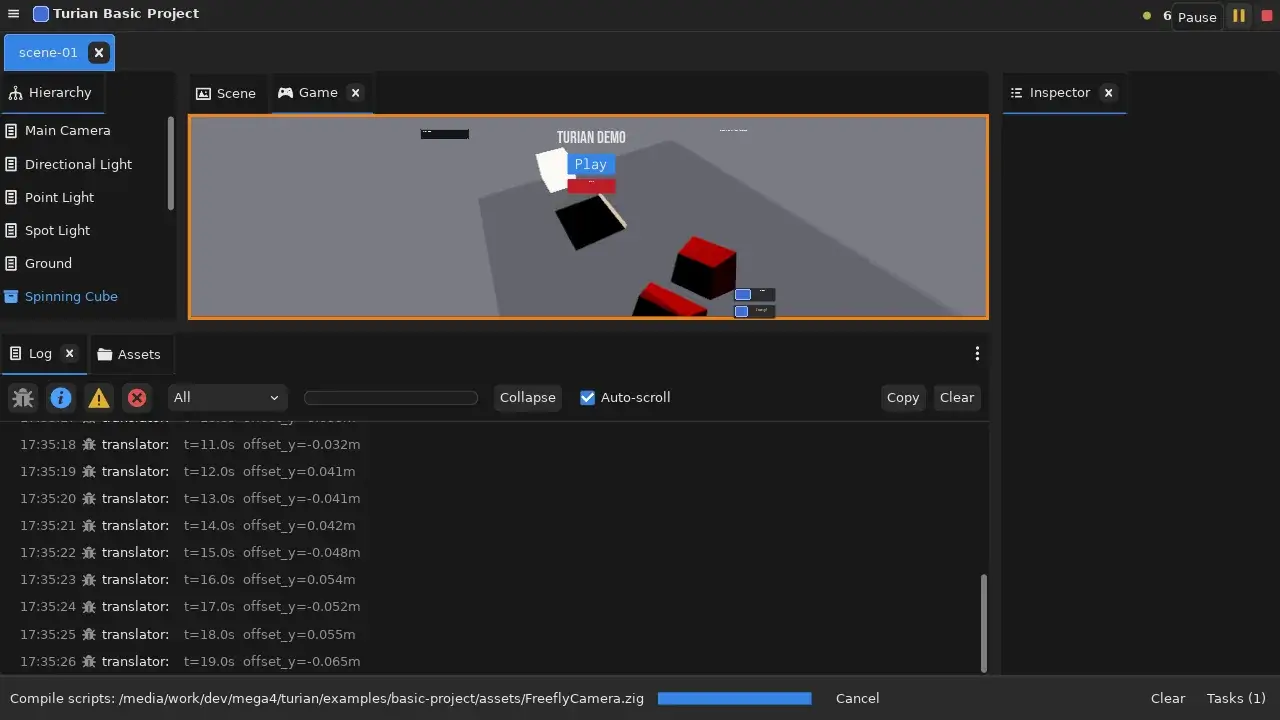
The new Log panel captures all engine and editor messages in a dockable console with filtering by log level (Debug, Info, Warning, Error), category dropdowns, and text search. Repeated identical messages collapse into a single entry with a repetition counter — essential when debugging tight loops. Stack traces for errors are automatically symbolized and expandable, with clickable file:line references.
You can now keep the log panel docked at the bottom of your layout without it getting in the way, and find the signal in the noise when something goes wrong.
Unified Settings Editor
Ticket #88
Studio settings used to live in scattered places — JSON files, individual panel menus, undocumented defaults. July brings a proper Settings editor that opens as a regular tab with a searchable sidebar, organized categories (General, Editor Camera, Asset Browser, UI, Performance, Shortcuts), and live modification tracking with a dirty indicator.
The editor reuses the same reflection and property-widget infrastructure as the Inspector, so every setting field benefits from the same type-specific editors, validation, and change tracking that asset properties do.
Asset Browser and Asset Previews
Tickets #79, #80, #83, #81, #68, #85, #72, #84, #19, #25
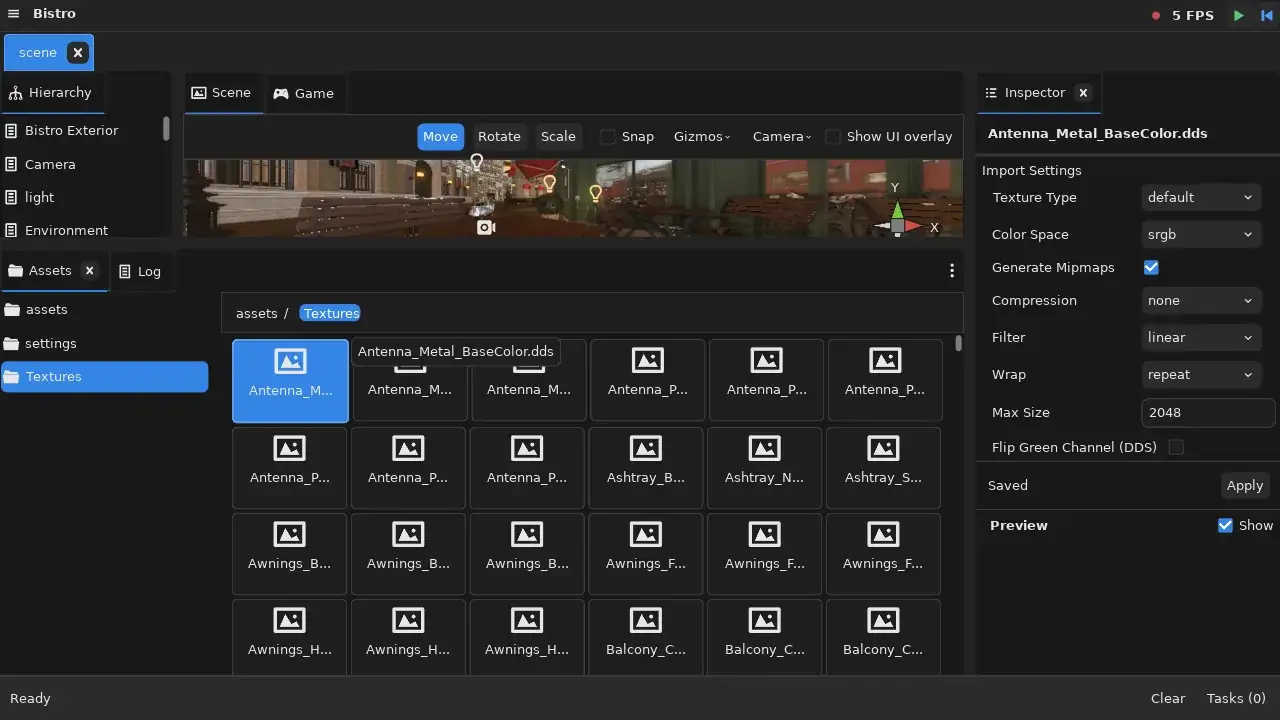
The Asset Browser gained three navigation modes this month — Grid (thumbnail tiles), Grid+Tree (tiles with a folder sidebar), and Tree Only (full folder and file tree) — toggled from a convenient icon in the toolbar. The breadcrumb bar is now clickable for quick upward navigation, and the Create menu cascades into categorized submenus instead of a flat list.
Grid cells became fixed-width, so a folder of 600 textures lays out as an even mosaic instead of a ragged one sized by filename length. Names that don't fit are truncated with the full name on hover, extensions can be hidden, and cells scale with the zoom level. Sub-assets — the meshes, materials, and prefabs cooked out of a single imported model — expand inline from a + badge on the parent tile.
Asset preview thumbnails arrived alongside these changes: selecting an asset shows a visual preview in the Inspector, with support for textures, models, and materials. The preview system is extensible through the same plugin infrastructure, so custom asset types can supply their own preview renderers.
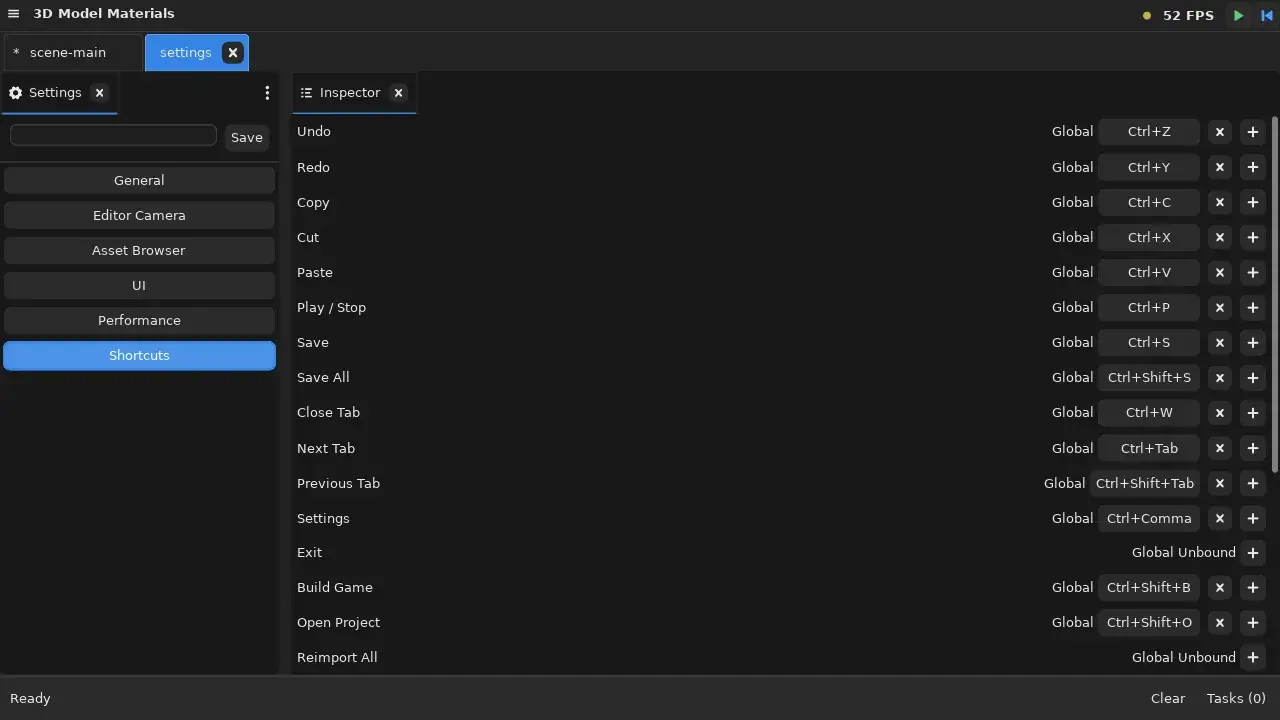
Shortcut Binding and Command Registry
Ticket #14
Keyboard shortcuts are now a first-class system. A central command registry maps every editor action — Undo, Redo, Save, Play/Stop, Build Game, Next Tab — to its default key binding. Users can rebind any shortcut through a dedicated editor inside Settings, add secondary bindings, or unbind a command entirely, with automatic conflict detection: if two commands try to use the same key, the editor surfaces the conflict immediately.
Active shortcuts appear next to their corresponding menu items, so discovering what's bound to what doesn't require memorization.
Scene View Orientation Gizmo
Ticket #126
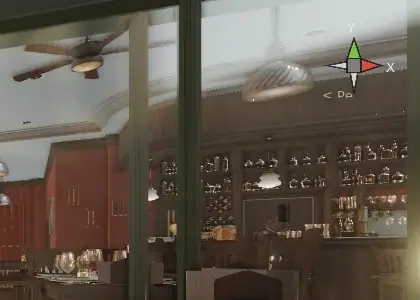
The Scene View gained a gyroscopic gizmo in its top-right corner — the axis widget familiar from Blender, Unity, and Unreal. It rotates to match the camera's world-space orientation, so you always know which way is up in a scene you've been orbiting for ten minutes.
It isn't just an indicator. Clicking a labelled face snaps the camera to look down that axis while keeping the current focus point centered, which makes lining up a front, side, or top view a single click instead of a careful drag. The projection mode sits right below it, one click from perspective to orthographic.
Background Tasks and the FPS Semaphore
Importing a project like Bistro spawns over a thousand individual import tasks. The taskbar used to show all of them, which is technically honest and practically useless.
The background-task system was overhauled so parent tasks with children collapse into a single aggregate progress bar — one bar tracking overall completion, an elapsed timer, and a Cancel button — while individual subtasks stay tracked internally, expandable, and independently cancellable.

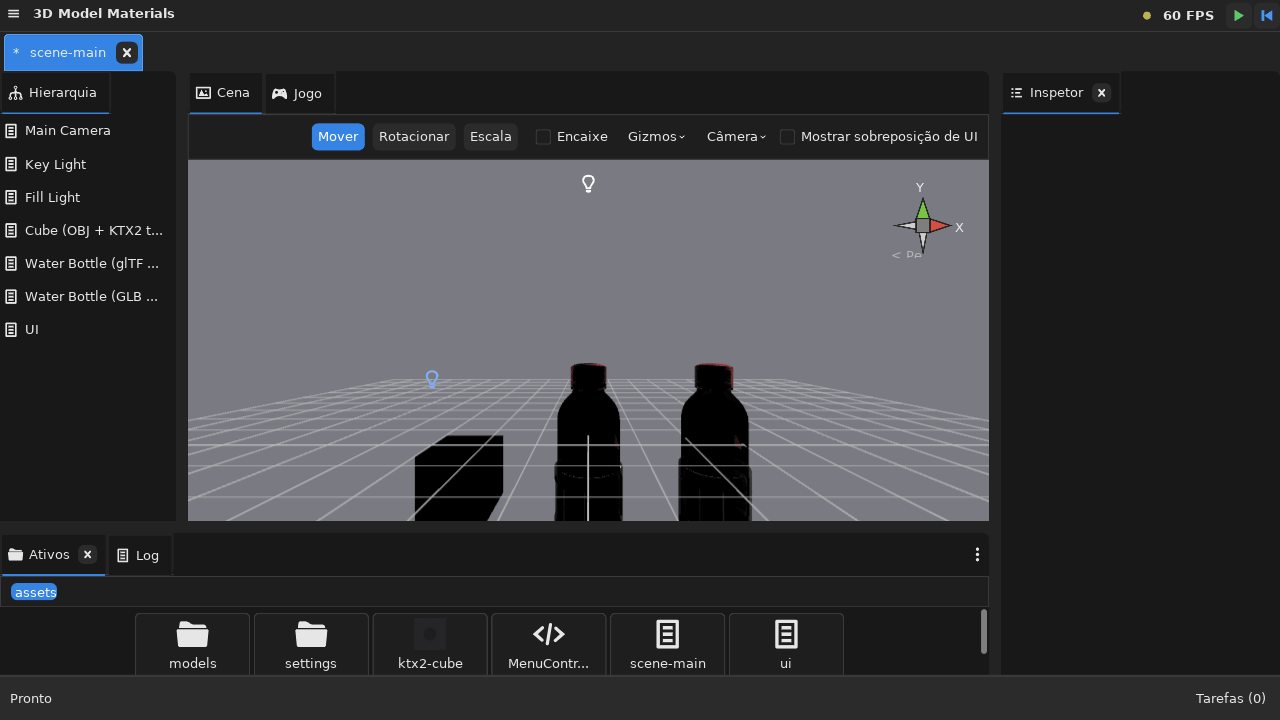
Alongside it, the status bar gained a persistent FPS counter with a traffic-light semaphore: green at or above 60 FPS, yellow at or above 30, red below. Both thresholds are configurable in Settings. Crucially, the counter samples actual frame presents rather than UI redraws, so it keeps reporting honestly when the editor is idle instead of freezing the moment you stop moving the mouse.
Localization
The Studio can now speak your language. A complete localization system ships with English and Brazilian Portuguese out of the box, with a framework designed to grow.
The i18n system goes beyond simple string replacement: it supports plural rules (following CLDR standards), message format interpolation, context-disambiguated translations, and per-locale font swapping — essential for CJK, Arabic, or Devanagari text. Built-in tools extract translatable strings from source code and compile them into binary string tables, so adding a new language is a data import, not a code change.
Switching is instant — change the language in Settings and the entire UI updates without restarting the Studio.
Games With a Face: In-Game GUI
An engine that can't draw a menu can't ship a game. In early July, twelve tickets landed at once to fix that.
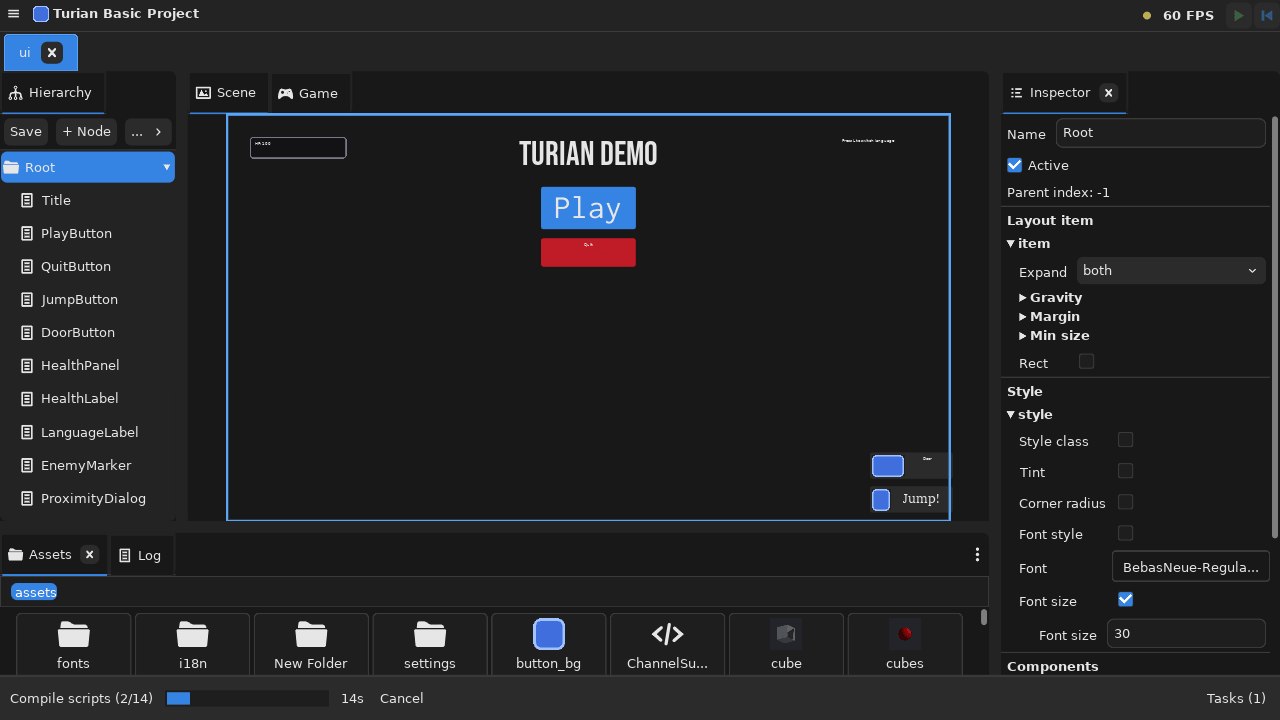
Turian games now have a proper in-game GUI system built on UIDoc assets — declarative UI documents you author in the Studio and instantiate at runtime. Ninepatch panels stretch artwork without distorting corners, labels handle text, and interactive buttons dispatch typed events straight into game code. Because a UIDoc is an asset, a title screen is something a designer edits and reloads, not something a programmer recompiles.
The editor is a WYSIWYG canvas with its own node tree and an Inspector for layout and style — expand, gravity, margin, tint, corner radius, font and font size — authored against a reference resolution with letterbox scaling, so the same document holds up across aspect ratios.
Later in the month the system gained GameEvent channel assets: a data-driven way to wire game logic — opening a door, starting a dialogue, playing a sound — without hardcoding references between components. A button in a UIDoc raises a channel; anything listening reacts. The Inspector can bind those bindings visually, in the spirit of Unity's UnityEvent.
Screenshot verification support landed at the same time, which makes automated visual regression testing of in-game UI layouts possible — the engine can render a UI frame headlessly and compare it against a reference image.
The Renderer Grows Up
July transformed Turian's rendering from functional to genuinely good-looking.
Image-Based Lighting and Skyboxes
Ask any artist: lighting makes or breaks a scene. Until now, Turian only supported analytic lights — directional, point, and spot. That left exterior scenes looking flat and artificial.
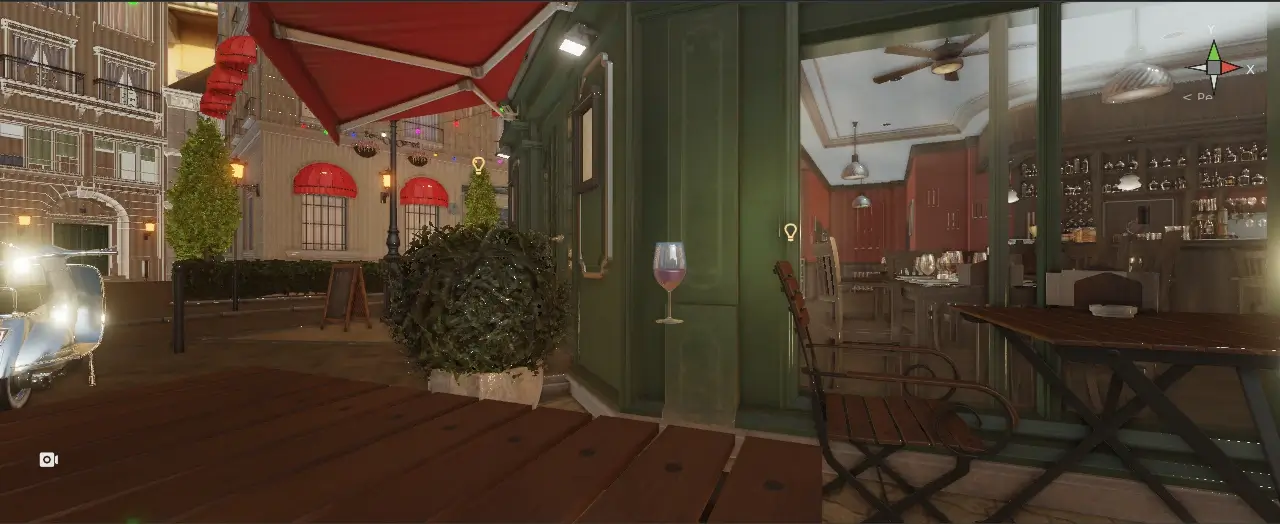
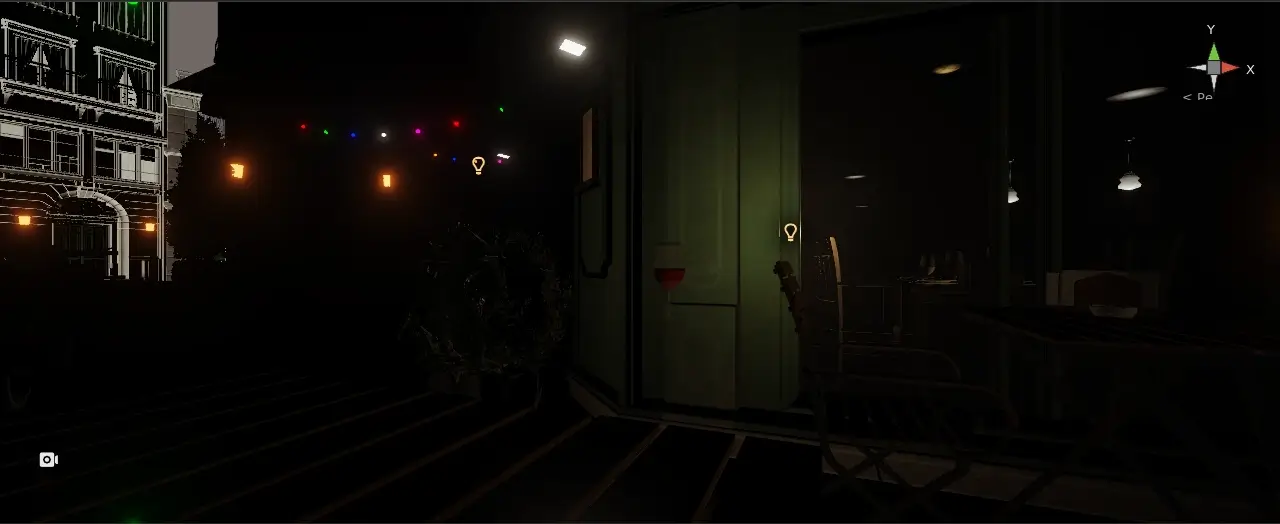
Image-based lighting changes that. Import an HDR environment map (.hdr, Radiance format) and it becomes both the visible skybox and the primary lighting source for your scene. The engine projects the environment into order-2 spherical harmonics for diffuse irradiance, and samples a prefiltered specular environment for reflections — both fed into the PBR shader alongside analytic lights.
That specular term got a second pass later in the month. The first implementation reused the equirectangular texture's own mip chain as a stand-in, which over-blurs near the poles and gets the reflection lobe shape wrong at grazing angles. It was replaced with a real render-to-cubemap conversion and GGX importance-sampled prefiltering per mip level — the standard split-sum approach. Reflections are now sharper at low roughness, correctly shaped at mid roughness, and free of pole artifacts. The scene-facing EnvironmentComponent API didn't change at all; only the sampling underneath did.
The result: outdoor scenes lit by a real-world HDRI look believable with zero manual light placement. A single environment map provides ambient, directional, and reflective cues that would otherwise require dozens of carefully positioned lights.
Drag the slider to compare the same scene with analytic lighting only (before) and with image-based lighting (after):
Color Management: sRGB and ACES Tonemap
Ticket #27
PBR lighting was running in gamma space — albedo textures lacked sRGB-to-linear conversion, and there was no tonemapping at the output stage. July fixes both.
Color textures (albedo, emissive) are now sampled as sRGB and converted to linear space before lighting calculations. Normal maps, metallic-roughness, and occlusion remain linear as they should. The entire lighting pipeline runs in linear space, and the final output passes through an ACES filmic tonemap — the industry standard for plausible, cinematic color reproduction — before gamma correction.
The result is physically correct lighting that matches how real-world cameras and displays behave. Metals look metallic. Shadows retain detail. Highlights roll off naturally instead of clipping to white.
HDR Post-Processing
Ticket #136
Correct lighting gets you a plausible image. Post-processing gets you a photograph.
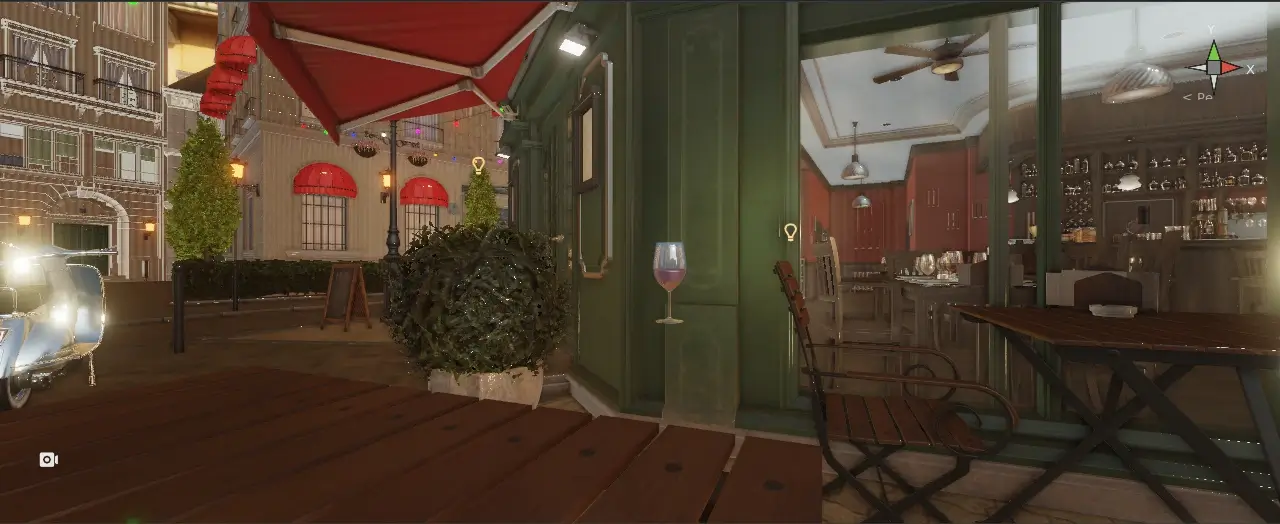
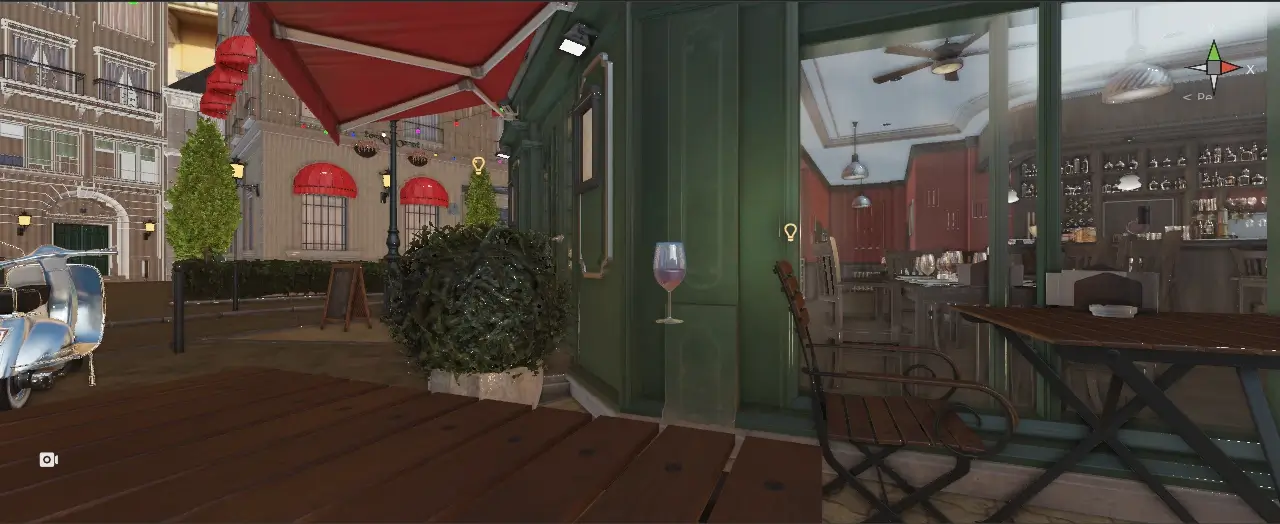
Turian now has a composable HDR post-process stack running after the lit pass: bloom (with configurable threshold, intensity and blur radius, so over-bright surfaces glow the way a real lens blooms), color grading in ASC CDL lift/gamma/gain form, and vignette (intensity, radius, smoothness).
The interesting part is how it's controlled. Rather than a global setting, effects live on a PostProcessVolumeComponent. A volume can be global — affecting the whole scene at full weight — or local, bound to a box or sphere around its node's transform. Overlapping volumes blend by priority and distance-based weight, and each effect category has its own enable flag, so a volume can override grading while leaving bloom untouched.
That means the mood of a scene can change as the player walks: warm and slightly bloomed under the awnings, cool and desaturated in the alley, no scripting required. Every parameter is a slider in the Inspector with live feedback.
Drag to compare the Bistro terrace with the post-process volume disabled (before) and enabled (after) — watch the lamps bloom and the edges fall away:
Blend Modes, Culling, and Alpha Mask
Ticket #26
Materials now support alpha and additive blending modes, configurable face culling (front, back, or none), and alpha-mask cutout rendering. Transparent objects, particle effects, foliage, and glass can now be authored without workarounds.
The Bistro Epic
Epic #132
Every engine needs a scene that breaks it.
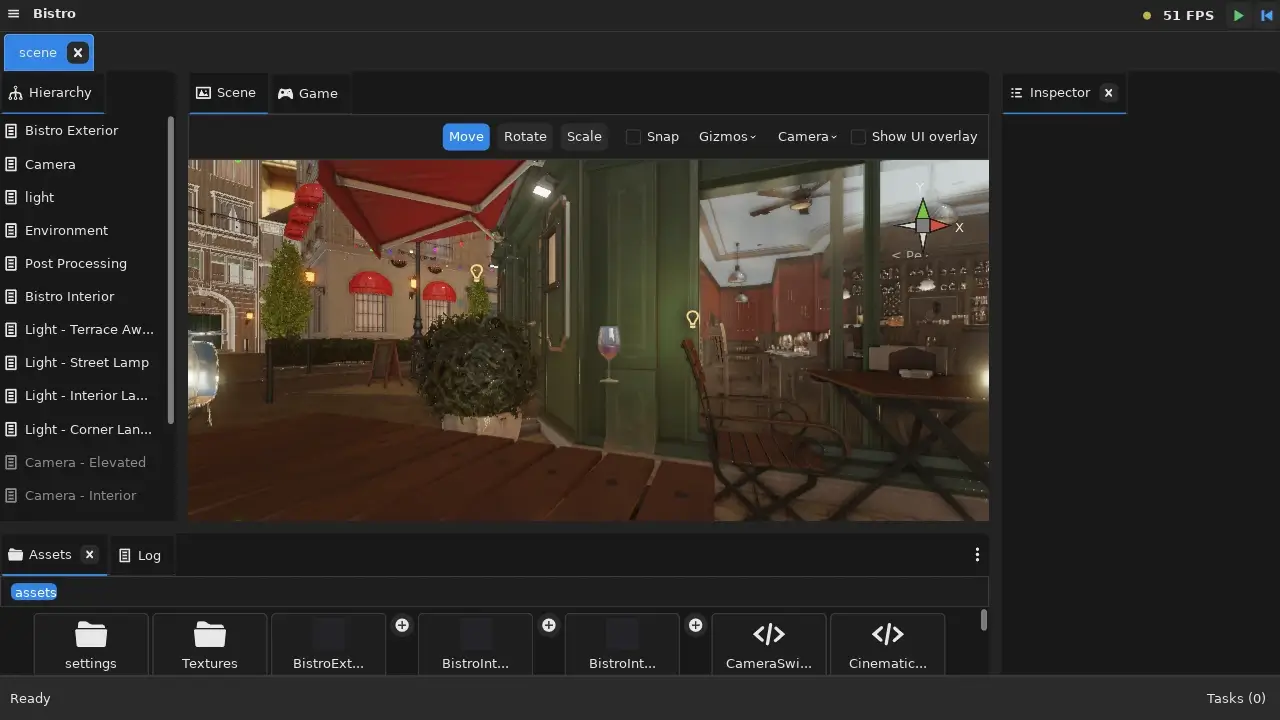
The Amazon Lumberyard Bistro is the standard stress test: a dense street corner with 2.8 million triangles in the exterior alone, 1,591 submeshes, 132 materials, and 633 DDS textures totalling 1.4 GB. It's the kind of asset a real production ships, and it exposed almost everything Turian was quietly getting away with.
Hitting the Wall
The first import "succeeded." The scene rendered 32 surfaces out of 1,591.
The cause wasn't the importer — it was a hardcoded MAX_SUBMESH_MATERIALS = 32 cap in the renderer. Lifting it meant changing how materials bind, which meant a breaking change to the scene format, which became v3.0.0 (more on that below). Materials now bind per material slot rather than per submesh index, so a mesh with 1,591 submeshes sharing 132 materials needs 132 slots, not 1,591. The cap rose to 160 and the GPU submesh limit was removed entirely.
Suddenly the whole street was visible. And completely unplayable.
Making It Fit
Ticket #141
Before optimizing the draw path, the data had to shrink. The FBX cook gained a vertex-welding pass that shares and indexes identical vertices, cutting a 272 MB vertex buffer down substantially and taking import time with it. Less GPU memory, better cache behaviour, faster iteration.
Culling, Three Times
Ticket #143
Frustum culling landed in three successive architectures, each one motivated by measuring the last.
First, CPU per-object culling: skip whole meshes outside the camera frustum. Bistro is essentially one enormous mesh, so this did nothing.
Second, CPU per-submesh culling: test all 1,591 submesh bounds every frame on the CPU. Better, but the per-frame CPU cost was itself the bottleneck.
Third, and current: GPU-driven culling. A compute pass tests every submesh's bounds against the frustum and writes indirect draw commands directly into a GPU buffer; the render pass then issues one DrawIndirect per material group. The CPU stops iterating submeshes altogether. Submeshes are sorted by material so pipeline and binding switches are minimized.
A related change moved scene lights into a GPU storage buffer, raising the per-scene light cap from 8 to 256.
Measure, Then Optimize
After three culling rewrites, framerate was still poor — and the honest conclusion was that nobody actually knew where the time went. Occlusion culling, Hi-Z, meshlets, and LODs were all plausible next steps, and picking one on a hypothesis would have been a fourth guess.
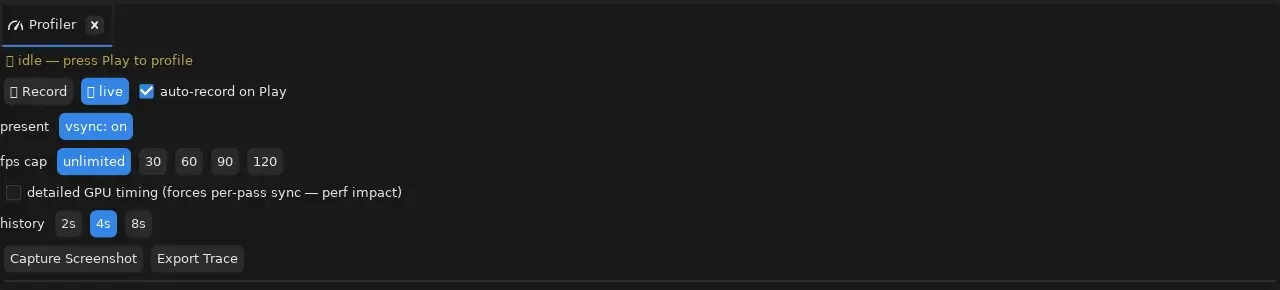
So instead of a fourth optimization, July added instrumentation: opt-in, fence-bracketed GPU timestamp queries around each render pass — shadow, cull compute, main, transparent — surfaced per-pass in the Studio profiler panel, alongside extended CPU zone coverage for the new compute phases. The profiler's gpu_time_ms had been a CPU-time proxy; now it's a real GPU timer.
The measurements immediately paid for themselves. One finding: opening an already-imported project re-read and content-hashed every source asset on every launch — 1.7 GB of texture bytes hashed to discover nothing had changed. A cheap mtime-and-size fast path turned that into a near-instant stat pass.
Per-pass GPU timing is opt-in for a reason: reading a timestamp back per pass forces a sync that costs more than the information is worth when you aren't actively hunting a bottleneck. The Profiler panel exposes it as a checkbox, alongside vsync and frame-cap controls, and records automatically when you enter Play mode.
Cheaper Frames
The measurements pointed at concrete, unglamorous wins: resolved materials are now cached instead of re-resolved per draw, the shadow pass got its own per-cascade frustum culling rather than drawing the whole scene four times, and the scene pass renders into a 4× multisampled target where the device supports it — sharper edges for a fraction of what supersampling would cost.
Looking Right
Ticket #157
With the scene finally interactive, the remaining gap against the ORCA reference render was perceptual, and it came down to occlusion. The IBL ambient term treats the environment as infinitely distant, so every crevice, every surface tucked under an awning, received the full hemisphere of sky light. The reference image is defined by its contact darkening.
Two things closed most of that gap.
Cascaded shadow maps. Directional shadows now use four cascades sharing a single shadow atlas, split with the practical logarithmic/uniform blend scheme, each with its own bias and its own GPU cull dispatch. Near cascades stay tight enough for crisp contact shadows; far ones still reach the end of the street.
Screen-space ambient occlusion. A new depth-and-normal prepass feeds an SSAO pass (plus a blur) that darkens the ambient/IBL term where geometry occludes itself. Corners, doorways, and the undersides of tables finally read as attached to the world rather than floating in it.
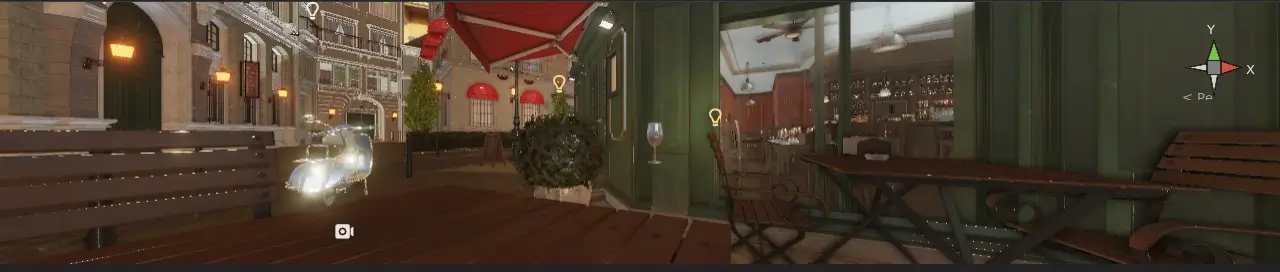
One honest caveat: the Bistro sample as authored is a night scene, lit mostly by street lamps and interior lights, while the ORCA reference is a bright daytime exterior. Because SSAO modulates only the ambient term by design, its contribution in the sample is real but subtler than a daytime comparison would show. Bounce lighting and local reflections remain open under #157.
Import: More Than Just glTF
FBX Import
glTF has become the modern industry standard, but FBX is still the format most digital content tools speak natively — Maya, 3ds Max, and many commercial asset libraries ship FBX.
Turian now imports FBX files directly, covering both binary and ASCII formats. Meshes, materials (with best-effort mapping to the engine's metallic-roughness model), embedded and external textures, and the full node hierarchy are all extracted and converted into engine assets. An FBX scene's hierarchy is preserved as a prefab with all its sub-assets, ready to drop into your own scenes.
glTF Hierarchy Import
Ticket #8
Previously glTF imported meshes and materials but discarded the scene hierarchy. July brings the same treatment: imported glTF and GLB files now preserve their node hierarchy as a prefab, with each mesh in its correct parent-child structure. A complex model with dozens of named parts imports as an organized prefab instead of a flat pile of meshes.
DDS Texture Import
Ticket #134
DirectDraw Surface (DDS) files — the format commonly used for pre-compressed GPU textures — can now be imported directly. All BC1 through BC7 block-compression formats are supported, with proper sRGB tagging and normal-map Y-flip handling. For assets that ship with pre-compressed DDS textures, no conversion step is needed.
Git-Friendly Metadata
A subtle but real problem: each asset's committed .meta sidecar mixed two very different kinds of data. Durable, authored fields — GUID, asset type, import settings, sub-assets — genuinely belong in version control, because every clone needs identical GUIDs for scene references to resolve. But the file also carried a pure staleness cache: source hash, size, mtime, importer version.
Git doesn't preserve mtimes. So the first import after any fresh clone was guaranteed to see a mismatch and rewrite every .meta in the project — a tracked-file diff caused purely by checking the repository out. Worse, any bug causing a spurious rewrite polluted git status for the entire team rather than one machine.
The cache fields moved into the already-gitignored .cache/ directory, keyed by GUID. Cloning a project and opening it now produces no .meta diffs at all, and bumping an importer version no longer touches a single tracked file.
The same pass fixed a small bug with an outsized effect: toggling a scene object's "active" checkbox in the Inspector didn't mark the scene dirty, so the change could be silently lost.
Cross-Platform: Windows Arrives
Turian Studio now builds and runs on Windows, with D3D12 as a fallback GPU backend alongside Vulkan. This was the month's largest infrastructure effort: fixing SDK detection, resolving platform-specific linking and file path assumptions, adding a cross-platform dynamic-library loader (Zig 0.16's std.DynLib has no Windows support), and verifying window creation and input handling. CI now compile-checks the full Windows Studio, and Windows releases ship both the CLI and the Studio.
Early August continued the work with a runtime-hardening pass covering the parts a first-paint screenshot can't prove: Play Mode's compile-and-load cycle — which builds a libturian_play.dll through a zig subprocess and loads it dynamically — plus script reflection and code generation, both of which had POSIX path assumptions baked in.
Cross-platform support isn't just about running on different operating systems. It also means the engine correctly targets each platform's preferred graphics API: Vulkan on Linux and Windows, D3D12 as the Windows fallback, and the infrastructure to support Metal on macOS in the future.
Version Bumps Without the Drama
July shipped two major version bumps — v2.0.0 and v3.0.0 — both triggered by real breaking changes, neither requiring more than a few minutes of migration.
v2.0.0: Per-Submesh Materials
The glTF/GLB importer originally cooked only the first primitive of the first mesh. v2.0.0 fixed that by introducing a proper per-submesh material system: the TMSH mesh format gained a submesh table, MeshRendererComponent swapped its single material field for a materials array, and scene files updated accordingly.
The full story — including why a single breaking change justifies a major version — is covered in the v2.0.0 announcement.
v3.0.0: Per-Material-Slot Binding
Ticket #140
Where v2 bound materials per submesh index, v3.0.0 binds them per material slot — allowing models with thousands of submeshes sharing a handful of materials to use only that many slots. The material cap rose from 32 to 160, and the GPU submesh limit was removed entirely.
Migrating is straightforward: run turian-cli migrate <project> to rewrite scene files, and update any code that accesses renderer materials to index by material slot instead of submesh. See the v3.0.0 migration guide for the full walkthrough.
And a Framework So the Next One Is Boring
Ticket #137
Two breaking changes in one month made a pattern obvious: project.json recorded a turian_version that nothing ever checked, and each migration was invented on the spot with no discoverable home for the next one.
July closed that gap with a proper version-check and migration framework. The engine compares a project's recorded version against its own on open — major mismatches always, minor via a Settings toggle. Migrations live one-file-per-version-bump in a hand-maintained registry, each carrying advisory metadata about whether it's idempotent. The v2 material_guid → material_guids fixup was folded in as the framework's first entry.
The CLI runner shipped first: turian-cli migrate <project> [--yes|--no] [--dry-run], unattended-capable for CI, with a dry run that lists every pending migration and any manual steps before touching a file. The Studio dialog that surfaces the same thing on project open is the next phase. Full rationale lives in ADR-0012.
Laying Groundwork
Not every change is a headline feature. Some are the invisible infrastructure that future features depend on.
Plugin and Package System
Turian now has a proper Plugin and Package System with manifests, modules, and runtime registration. Plugins can register custom menus, dockable panels, and property drawers in the Inspector. Package manifests declare dependencies and capabilities, and the runtime discovers and loads them from the project folder automatically.
This is the foundation for a future package ecosystem — community plugins, asset packs, and engine extensions that can be installed without touching engine source code.
A Thinner Studio
Ticket #152
The Studio had accumulated a services/ folder full of modules that weren't really about UI at all — project operations, session state, undo, clipboard, import jobs. Those moved into editor/, which was itself regrouped by function (project/, session/, assets/, build/, tasks/, shortcuts/, i18n/).
The payoff is a hard boundary: editor/ is GUI-free and testable without a window, and studio/ is a UI shell over it. That's what makes headless tooling — the CLI, CI checks, the MCP server — able to reuse editor logic instead of reimplementing it. The rule is written down in ADR-0015.
Architecture Decision Records
The reasoning behind the month's larger choices is now written down rather than living in commit messages: fifteen ADRs covering the package system, dependency injection, gizmos, play mode, lighting and shadows, GPU-driven culling, project versioning, and the editor/studio boundary.
Font as a First-Class Asset
Ticket #109
Font files are now managed through the same import pipeline as models and textures. Font assets support per-locale overrides (essential for CJK text rendering) and integrate with the localization system for automatic font switching.
Build Output, Project Icon, and CI
The build pipeline now outputs to a configurable .public folder, and projects can set a custom icon that appears in the built executable's window and taskbar. The Studio picked up a favicon and an About dialog. On the infrastructure side, the release pipeline's logic moved out of YAML and into subcommands of a Zig release tool — the same code runs locally and in CI — and the pipeline itself collapsed to two stages.
License Change to MPL 2.0
Turian relicensed from GPLv3 to the Mozilla Public License 2.0 — file-level copyleft instead of project-level, so you can ship a proprietary game on top of the engine while improvements to the engine itself stay shared. The change came directly out of community feedback; the reasoning is in Moving from GPLv3 to MPL 2.0.
Looking Ahead
July took Turian from a promising start to a genuinely pleasant development environment. The Studio feels like a professional tool — dockable panels, customizable themes, keyboard shortcuts, a real log panel, localization. The renderer produces images that hold up. Import handles the two formats that matter. And a scene that once drew 32 surfaces now streams a whole street corner.
The Bistro epic isn't finished — bounce lighting, local reflections, and occlusion culling are all still open — but it did its job. Every one of those numbers came from a real scene refusing to cooperate, which is a much better teacher than a benchmark.
August continues from here: deeper rendering work, animation, audio, and the Studio-side half of the migration dialog. The roadmap tracks what's coming next.
Download the latest release, explore the documentation, and join us on Discord or Matrix to follow along.
See you in the editor.
#release#editor#engine#studio