2026 October Release
Last month I wrote that 2.x would only get compatible changes, and that the next break would be 3.0. That break came in October, and it comes with a migration guide.
October was the month Turian stopped being an editor with a renderer and started being an engine you could make a game in. Things fall and collide now. A camera only draws what it sees, and ten thousand copies of a crate cost one draw call. Designers can wire a game together with assets. A script can wait two seconds without a coroutine, and a game can save. The same project can export a windowed client or a server with no window at all. And Studio, the editor all of this is built in, finally has a Scene view that behaves like the ones you already know.

- Why a 3.0
- Things Fall Down: 3D Physics
- Draw Less, Draw Faster
- Lines, Trails and Words in the World
- Designers Wire the Game
- Time, Waiting and Saving
- The Scene View Grows Up
- A New Look
- Turian Without a Window
- Guinevere 5.7 to 6.5
- With your help
Why a 3.0
Turian 3.0.0, tickets #35, #47, #62, #213
Two pieces of work could not be done compatibly. The renderer had to leave the engine core, so that a server build stops carrying Vulkan. And themes had to move to a real style sheet format, because the old color tables could not express what Material 3 needed. Both were already in flight when 2.0 shipped, and holding them back would only have meant more 2.x projects to migrate later.
As with 2.0, the breaks shipped together, in one release, with one migration guide:
| Change | Who is affected | Upgrade steps |
|---|---|---|
| The Vulkan renderer became a brick | code that used renderer types directly; existing projects get the brick automatically | Renderer |
| Settings and build profiles are registered in a project asset | every project, converted automatically when opened | Project asset |
| glTF became the internal mesh format, and OBJ import an optional brick | projects with .obj models, exported games, mesh tooling |
Models |
Color themes became .pss style sheets |
custom themes, plugins that read theme colors | Themes |
| Gaya settings take their configuration from class attributes | plugins with settings pages or tab-strip widgets | Gaya |
| Guinevere 6 changed drawing and styling | code that draws with Guinevere directly | Guinevere |
Scenes, prefabs and DataAssets keep their ids, so your content does not need converting. Every release after 3.0.0 has been compatible.
Things Fall Down: 3D Physics
Turian 3.5.0 and 3.6.0, tickets #64, #48, #111
Physics was the biggest gap between Turian and every engine it gets compared to. It closed this month, and like everything optional in Turian it arrived as bricks.
There are two of them. org.mass4.turian.physics holds the components, the settings and a backend contract, and simulates nothing on its own. org.mass4.turian.physics.bepu plugs BepuPhysics v2 into that contract. Bepu is a fast, multithreaded physics library written entirely in C#, so it needs no native binaries and runs wherever .NET runs. Install both and things fall. The front end never names Bepu, so a different backend can replace it later without touching your scenes.
If you know Unity's physics, you already know this one. The names and behavior follow it on purpose:
- Rigidbodies: mass, damping, gravity scale, kinematic mode, interpolation, continuous collision detection, frozen axes and center of mass. Forces take Unity's
ForceMode. - Colliders: box, sphere, capsule, cylinder, mesh and heightfield. Several colliders under one body form a compound, and a collider without a body is static.
- Joints: fixed, hinge, slider, ball-socket, distance and spring. Hinges and sliders have motors, limits and springs.
- A character controller with
MoveandSimpleMovethat climbs steps and slopes and rides moving platforms. - Wheel colliders for raycast vehicles, with suspension, tyre friction curves, motor and brake torque, and steering.
- Physics materials as DataAssets, with friction, bounciness and Unity's combine modes.
- Queries: raycasts, shape casts, overlaps and penetration tests, filtered by the physics layers that arrived with tags and layers earlier in the month.
- Callbacks: collision and trigger Enter, Stay and Exit, on any component that implements the handler interface.
- Ragdolls:
RagdollBuilder.FromSkeletonfits capsules and limited joints to a skeleton's bones. The rig switches between following the animation and falling under physics, and can return to its bind pose.

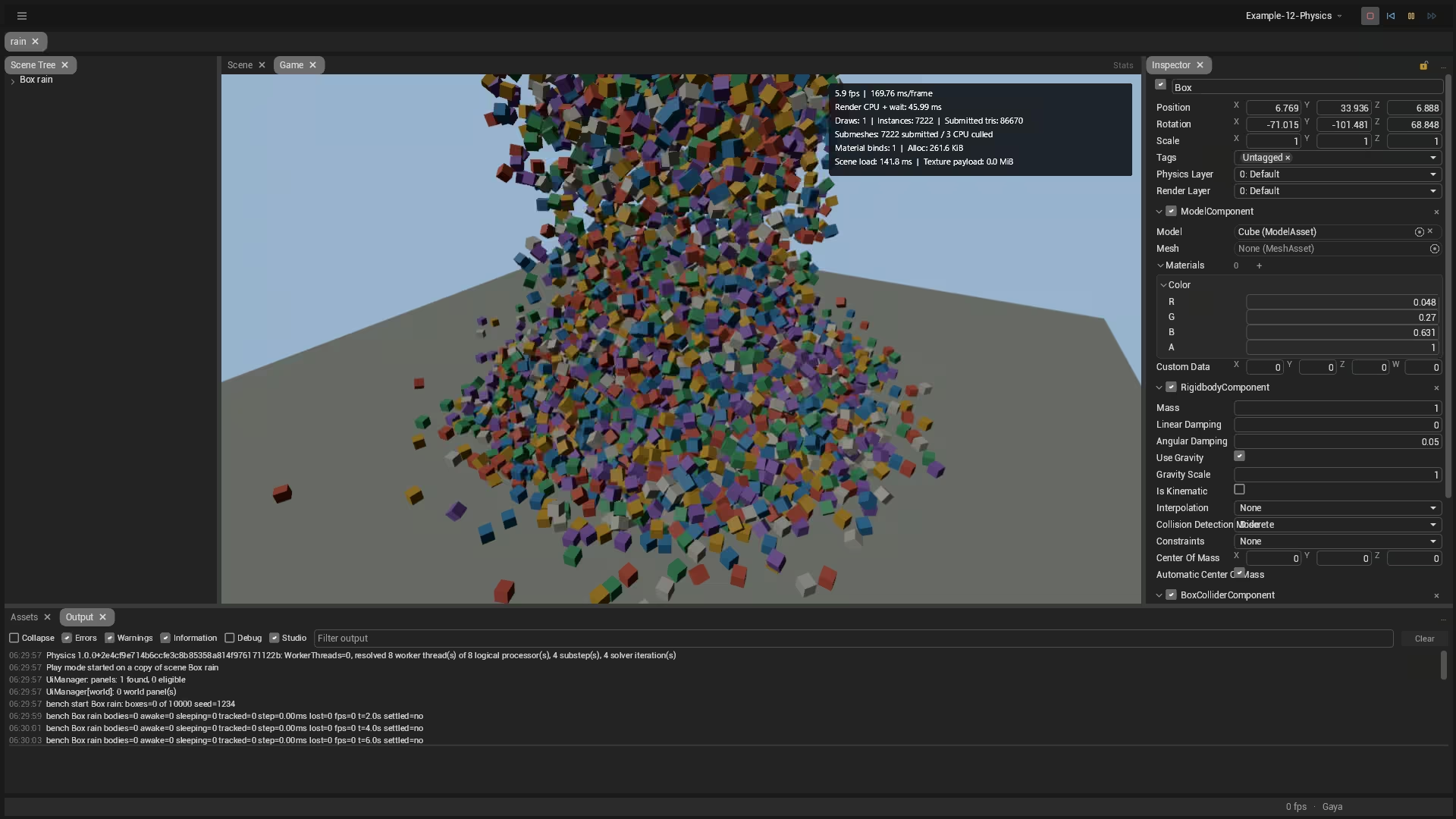
In a benchmark project, a box rain drops 200 boxes a second until there are 10,000, and on my workstation the exported game holds about 80 frames per second with all of them still awake. Once the pile settles, every box goes to sleep and a physics step costs a fraction of a millisecond. Those are one machine's numbers, not a promise, but they kept getting better as the month went on, because the profiling also found and removed allocations elsewhere in the engine.

What is not there yet: a dedicated editor for the layer collision matrix (the Inspector shows it as 32 raw masks), and determinism across machines. Bepu is deterministic on the same machine only.
Draw Less, Draw Faster
Turian 2.1.0, 3.0.0 and 3.2.0, tickets #8, #59, #104
The fastest thing to draw is something you skip.
Frustum culling
A camera only sees what is inside its frustum, the pyramid between its near and far planes. Until this month, the renderer sent every mesh to the GPU anyway and let the GPU throw away what fell outside the screen. Now each submesh keeps cached world bounds, and anything outside the active camera is skipped before a draw is recorded or its material is even looked up. It handles rotated and scaled nodes, procedural models, and perspective and orthographic cameras.
On a benchmark scene, a large street with about 1,600 submeshes, from five cameras:
| Camera | Culling off | Culling on | Submitted | Culled | Pixels changed |
|---|---|---|---|---|---|
| Main | 2.43 ms | 2.12 ms | 1,322 | 269 | 0 |
| Overview | 2.47 ms | 2.43 ms | 1,591 | 0 | 0 |
| South | 2.55 ms | 2.48 ms | 1,521 | 70 | 0 |
| West | 2.25 ms | 1.76 ms | 634 | 957 | 0 |
| East | 1.93 ms | 1.05 ms | 44 | 1,547 | 0 |
The overview sees the whole street, so there is nothing to skip. The east camera sees only a corner of it, skips almost everything, and nearly halves its frame. In every case the image is identical to the pixel.


GPU instancing
Draw calls are expensive in themselves: each one costs CPU time to record, however small the mesh. The renderer now merges every run of identical mesh and material into one instanced draw. Ten thousand identical props that used to cost 8,791 draw calls now cost one, with the same pixels. Each copy can still carry its own color tint and four custom values without splitting the batch.
For systems that own many copies of one model, such as foliage, crowds or debris, the new Instanced Model component draws them all from one GPU buffer, uploads only the instances you change and culls the whole set at once: 10,000 colored cubes take about 0.6 ms of CPU time. Clicking any instance in the Scene view still selects its node.

Seeing the frame
All of these numbers are visible without a profiler. The Frame Statistics HUD overlays the Scene and Game views with frame time, draw calls, instances, and submitted and culled counts, and headless screenshots report the same counters, so a CI job can catch a regression too. Studio itself now renders on demand: when nothing changes, it stops redrawing and leaves the GPU to your game.
Lines, Trails and Words in the World
Turian 3.8.0, ticket #110
Three small components:
LineRendererdraws a path through a list of points, flat or always facing the camera, with width and color curves along its length and an optional stretched or tiled texture. Laser beams and ropes, mostly.TrailRendererrecords where its node has been and draws a ribbon that fades with age. Sword swings, tyre marks, a comet's tail.WorldTextComponentplaces text in the 3D world, with any font Guinevere can load. It is drawn from a signed distance field, so it stays sharp at any distance and angle. Damage numbers and signposts.
All three respect render layers, sort with transparent geometry and work in the Scene view as well as in the game. They are also handy for debugging: the physics test scenes use them to draw query lines, trails and floating collision numbers.

Designers Wire the Game
Turian 2.2.0 and 3.7.0, tickets #91, #55
In September I promised that DataAssets would be the backbone of how designers work, and pointed at Ryan Hipple's 2017 talk on ScriptableObject architecture. October brought the pattern itself: the assets from that talk, and the Studio tools to wire and debug them.
Events, variables and listeners as assets
The new org.mass4.turian.ddd brick, for DataAsset-Driven Design, brings the asset families from that talk to Turian:
- Events, with or without a payload: "player died", "coin collected", "door opened".
- Variables and constants: the player's health is a
FloatVariableasset that the health bar, the audio and the save system all read, and each of them hears when it changes. - Runtime sets: "every enemy alive right now", maintained by the enemies themselves as they spawn and die.
- Listeners and responses, so reacting to an event needs no script.
- Asset enums with state transitions, for game states such as menu, playing and paused.
- An input reader that turns an input action into events and variables.
A component field of type DataAssetReference<T> accepts either a plain value or a variable asset, so a designer decides whether a value is local or shared without asking for a code change. The UI brick's buttons can raise events and follow Enabled and Visible variables directly.
Raising an event does not allocate, and costs about 4 ns with one listener and 12 ns with eight. That is cheap enough for gameplay, though I would still keep per-tick and per-contact engine callbacks as direct calls.
The companion org.mass4.turian.ddd.studio brick adds the tools. Create → DDD in the Assets panel makes each asset family, and View → DataAsset Overview shows who raises, listens to and references each asset and finds the ones nothing points at. Validate wires catches missing targets and mismatched payload types. In Play Mode, you can raise an event from the editor, watch a variable's live value and change it. For your own payload types, the DDD Type Generator writes the event, variable and set classes for you.
Not there yet: lists and dictionaries as assets, private variable copies per prefab instance, and saving variables, which will go through the save brick rather than a format of their own.
Tags and layers
Nodes can now carry several string tags, found through indexed scene queries such as FindAllWithTag, plus separate 32-slot physics and rendering layers. Cameras and lights can filter by rendering layer, and the Scene view can hide or lock layers. The tables themselves live in a Tags and Layers settings DataAsset with stable ids, so renaming or reordering an entry does not break a scene or prefab that uses it. Existing content loads as Untagged on the Default layers without rewriting a file. The design those tables are growing into is long enough for its own post: Tags and Layers as Assets.
Time, Waiting and Saving
Turian 2.1.0, 3.2.0 and 3.3.0, tickets #155, #88, #89
Waiting without coroutines
Unity scripts wait with coroutines, and most large Unity projects end up replacing them with UniTask. Turian goes straight to C#'s own async and await. Every component has an Async property with waits bound to the component's lifetime:
public class Door : Component
{
    public bool IsBlocked { get; set; }

    public async ValueTask OpenAsync()
    {
        Node.Position += Vector3.UnitY;
        await Async.Seconds(2);           // scaled game time
        await Async.Until(() => !IsBlocked);
        Node.Position -= Vector3.UnitY;
    }
}
There are waits for the next frame, the next fixed tick, scaled seconds, unscaled seconds, real time and fixed-tick time, and for a condition to become true or false. Every continuation runs back on the game loop, never on a worker thread. When the component is destroyed, its pending waits are cancelled instead of firing on a dead object. Studio's pause freezes game-time waits and lets real-time ones keep counting. A pending wait allocates nothing, and the compiler flags the classic mistakes, such as async void, Task.Delay and a stored ValueTask, in game code.
A clock you can trust
A TimeSettings asset now sets the fixed simulation rate and how many ticks a slow frame may catch up. Behind it, a shared simulation clock counts completed ticks, pauses and single-steps. On top of the clock, SimulationSession gives a game an authoritative world that accepts commands, deduplicates them, numbers its ticks and keeps named, reproducible random streams. Play Mode, the headless player and the exported game all share the same tick boundary. A test world produces the same state hash at every tick whether the screen runs at 30, 60 or 144 Hz, and again after a save and resume. Networking itself is not here yet, but this is the ground it will stand on.
Saving the game
September's RuntimeSave checkpoints the simulation. The new org.mass4.turian.save brick is what a game uses to put those checkpoints, and its own save data, somewhere safe:
- Versioned schemas. Each save records its game's schema version, and a chain of migrations upgrades old saves one version at a time on load, without rewriting the stored file.
- Pluggable everything. JSON by default, and any serializer (MemoryPack, MessagePack, protobuf) or container format can plug in. Optional AES-GCM encryption is included.
- Nothing lost. Writes go to a temporary file first and replace the slot only when complete. The previous generation is kept as a backup, and corruption is reported, not silently loaded.
- Conflicts, not overwrites. Every write states which revision it expects to replace, so two machines or two processes cannot quietly clobber each other. The same contract carries over to cloud storage, with a sample that simulates a conflicting cloud save.
It has no dependency on the renderer or any third-party serializer, so it works in clients, dedicated servers and tests.

The Scene View Grows Up
Turian 2.1.0 to 3.0.0, tickets #82, #68
Most of an editor's time is spent in the Scene view, so most of October's Studio work went there.
Gizmos. The transform handles were rebuilt: thicker arrows, solid scale boxes, filled two-axis handles, and rotation arcs that face the camera, highlight on hover and show the swept angle while you drag. Rotation works around world or local axes, with angle snapping. A combined tool shows move, rotate and scale at once. The handles stay visible in front of scene geometry, so an object buried in a wall can still be moved.


Orientation. A compact orientation control sits in the corner: a small cube with labeled axes. Click an axis to look along it, and click the center to switch between perspective and orthographic without losing your framing. The reference grid now clips correctly at the camera and defaults to the XZ plane with colored origin axes, and a settings page controls its spacing, emphasis and opacity.

Navigation. Right-button mouse-look keeps the horizon level and cannot flip upside down. The arrow keys move the camera through editable, continuous shortcuts, and Shift speeds them up. The Scene panel gathers its tools, coordinate space and snapping into a compact icon toolbar, and a Cap FPS setting keeps an idle Studio from heating your laptop.
Multi-object editing. The hierarchy and Assets panel take Ctrl-click, Shift-click ranges and Select All, and the Scene view takes rectangle selection. The Inspector then shows the components the selection has in common, with mixed values shown as "—". Edit a shared field and every selected object changes. Edit one axis of a transform and the other axes keep their own values. Batch delete, duplicate, reparent and move each undo in one step.

And the rest. In the commit log this was summed up as "1001 fixes that were driving me crazy", and that is about right. The ones you will notice first:
- Temporary scenes. File → New Scene (Ctrl+N) opens a scene for experiments, with no asset created until you save.
- A revamped Assets panel.
- A loading card shows what Studio is importing and compiling while a project opens.
- Faster reopening. A project reuses its imported files when nothing changed, and Build & Run copies only the assets that did.
A New Look
Turian 3.0.0, tickets #212, #213, #214, #215, #217
Studio now defaults to Material 3, Google's current design system, drawn by Guinevere.


Underneath, appearance is split into four independent choices: the look (the shape of every control), the color theme, the icon set and the fonts. Themes are .pss style sheets, Guinevere's take on CSS, and they reload live while you edit them. Icon sets come in Mono and Color.
Looks and themes are bricks, so anyone can make and share one. turian-cli can package a theme as a brick from the command line, and the Bricks panel moved into Gaya, with separate scopes for bricks that belong to Studio itself and bricks that belong to a project. The first two extra looks are a bit of nostalgia: Windows XP and Windows 9x, installed like any other brick.


The in-game UI benefits too: on Vulkan, it is now rendered on the GPU.
Turian Without a Window
Turian 3.0.0 to 3.8.0, tickets #35, #62, #292, #313, #344
Not every build of a game has a screen. A dedicated server or a headless simulation in CI has no use for a GPU, and should not have to ship one.
- Build profiles. A project now holds several build profiles, each with a platform, a client or server role, a configuration and its own defines and settings, edited in a Build Profiles window.
Assets/Project.dataassetregisters them, together with the project's settings and the engine version that last saved it. - Headless servers. Because the renderer is a brick, a server profile simply leaves it out. The headless player runs the same scenes and the same simulation ticks, and quits cleanly on Ctrl+C.
- NativeAOT servers. A desktop server profile can compile ahead of time to a single native executable, with no .NET runtime to install and no JIT warm-up. The editor generates the startup code that reflection used to provide, and a missing piece fails loudly at export instead of at runtime. Our test servers export, run and exit cleanly with zero trimming warnings.
- Slimmer bricks. The engine keeps shrinking toward a core. Cameras, in-game UI, OBJ import, saves and the Windows looks now live in their own brick repositories, and localization left the core and the renderer for its own brick this month. Bricks can also declare the NuGet packages they need, as the Bepu backend does, and depend on sources pinned to a git commit or an archive checksum.

Guinevere 5.7 to 6.5
Studio is drawn by Guinevere, so a good part of what you just read is Guinevere work. This month's releases went from 5.7 to 6.5. The only breaking one was 6.0, the base of Turian 3.0's new look:
- Styling. Material 3 is the default for the Excalibur controls, with the previous look still available as
ExcaliburStyles.Classic. Style sheets became.pssfiles in their ownMASS4.Guinevere.Stylingpackage, with value expressions, theme color functions, system color scheme and accent color, text shadows and glow, and bitmap and 9-slice backgrounds. - GPU drawing. The Silk.NET, OpenTK and Raylib integrations draw with Skia on the GPU, keeping the CPU as a fallback, and every integration renders on demand by default.
- Animation. Keyed springs and tweens, property transitions and animated state changes.
- Render effects. Ordered effect stacks apply to a whole panel, text, shapes and images included. Thirteen built-in filters cover blur, glow, shadows, color adjustments, pixelation, chromatic separation and sharpening, configurable from C# or
.pss. - A code editor. The new TextEditor package is a virtualized source and shader editor with multiple carets, rectangle selection, folding, find and replace, completion, hover documentation and background diagnostics. It handles a 100,000-line file normally.
- Text. Rich text with styled spans, links and inline images, a streaming Markdown control with syntax-highlighted code blocks, typography controls (spacing, tab stops, justification, kerning) and optional shaping for ligatures and combining marks. Text layouts are now cached and shared between measuring and drawing.
- Graphs. The new
MASS4.Guinevere.Graphspackage is a node-graph editor: nodes, ports and links on a pannable, zoomable canvas, with rectangle selection, groups that collapse, copy and paste, undo, a minimap, and styling through.pss. It is fully usable from the keyboard, and on Linux it reports itself to screen readers through a new desktop accessibility bridge. - Games, gamepads and touch. Gamepad focus navigation, semantic controller actions, multi-touch with optional gestures, safe-area viewports for phones, and HUD primitives for in-game UI.
- Smaller things. A color picker built from swappable parts, a searchable multi-select dropdown, flag-aware enum editors, and dock tabs that show where they will land.

With your help
There are a lot more fixes, tweaks and enhancements not listed here. For the complete list, see the changelog. The documentation covers bricks, rendering, gizmos and themes. If something breaks, tell me on GitHub. If you want to help fund the next release, you can find me on Patreon or Ko-fi.
#release#engine#studio#physics#dotnet